

前言
我的导航站点项目需要将每一个二级分类分成一块一块的布局,如下图所示
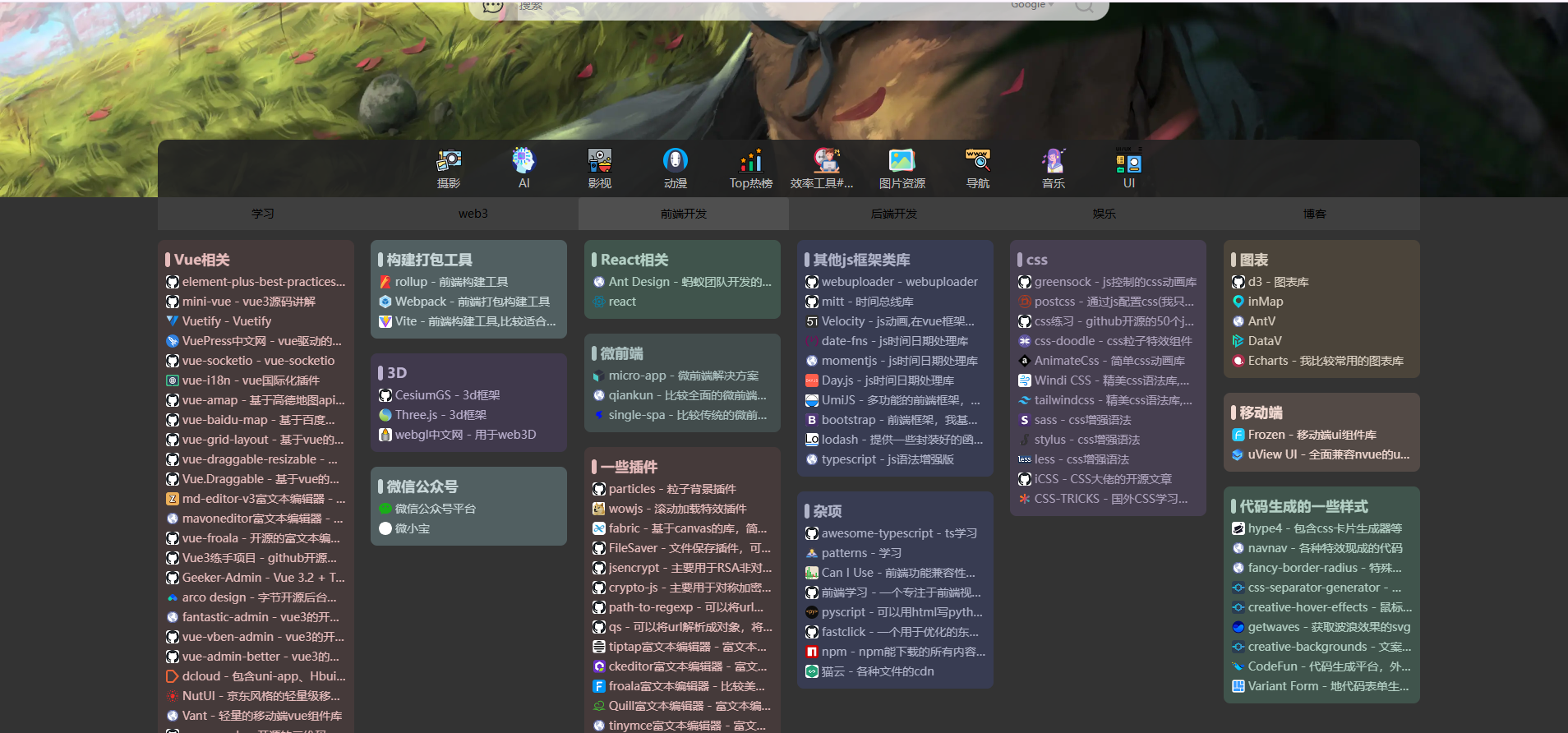
不同的瀑布流布局实现方案
由于每一块的高度是根据内容量动态变化的,传统的css解决方案无法处理,而且也不够灵活,所以选择使用js实现
代码实现
思路:封装一个vue钩子函数,通过传入分类模块的容器div,获取每一个模块进行计算绝对定位位置,使得每一个分类排列整齐;添加resize监听器,监听视窗 大小变化实时调整瀑布流;添加防抖函数,降低视窗大小变化时瀑布流调整的频率,减 少css重排;
瀑布流算法如下
容器宽度、间距宽度、元素个数固定,元素宽度自适应
// 分类模块的瀑布流布局
// 容器宽度、间距宽度、元素个数固定,元素宽度自适应
import { onBeforeUnmount, onMounted } from 'vue';

/**
 *
 * @param container 瀑布流容器
 * @param gapWidth 元素间隙宽度
 * @param columnCount 每一行元素个数
 */

function useWaterfall(originalContainer: HTMLElement, gapWidth: number) {
  let container: HTMLElement = originalContainer;
  let itemList: HTMLElement[];
  let columnCount: number;

  let timer: number = null!;

  const setContainer = (newContainer: HTMLElement) => {
    container = newContainer;
  };

  // 计算列数和间隙宽度
  const calc = () => {
    const gapCount = columnCount - 1;

    const leftSpace = container.clientWidth - gapWidth * gapCount;
    const columnWith = leftSpace / columnCount;

    return {
      columnWith,
    };
  };

  // 设置瀑布流元素的位置
  const setPosition = () => {
    if (!container) return;
    itemList = Array.from(container.children) as HTMLElement[];
    container.style.position = 'relative';
    const { columnWith } = calc();

    const columnHeight = new Array(columnCount).fill(0);

    // 遍历每一个元素,使其填充到最短列的下面
    for (let i = 0; i < itemList.length; i += 1) {
      const item: HTMLElement = itemList[i];

      item.style.width = `${columnWith}px`;

      // 确定子分类模块与顶部的距离
      const top = Math.min(...columnHeight);
      item.style.top = `${top}px`;

      // 重新设置当前这一列的高度
      const index = columnHeight.indexOf(top);
      columnHeight[index] += item.clientHeight + gapWidth;

      // 确定子分类模块与左边的距离
      const left = index * gapWidth + index * columnWith;
      item.style.left = `${left}px`;

      item.style.position = 'absolute';
    }

    // 设置子分类模块容器的整体高度
    const height = Math.max(...columnHeight);
    container.style.height = `${height}px`;
  };

  // 根据页面宽度设置展示多少列
  const setColumnCount = () => {
    const screenWidth = window.innerWidth;
    if (screenWidth < 380) {
      columnCount = 1;
    } else if (screenWidth < 768) {
      columnCount = 2;
    } else if (screenWidth < 1200) {
      columnCount = 3;
    } else if (screenWidth < 1600) {
      columnCount = 4;
    } else if (screenWidth < 1920) {
      columnCount = 5;
    } else if (screenWidth < 2560) {
      columnCount = 6;
    } else {
      columnCount = 7;
    }
  };

  // 监听页面缩放
  const handleResize = () => {
    setColumnCount();
    if (timer) {
      clearTimeout(timer);
    }
    setTimeout(setPosition, 300);
  };

  window.addEventListener('resize', handleResize);

  onMounted(() => {
    setColumnCount();
  });

  onBeforeUnmount(() => {
    window.removeEventListener('resize', handleResize);
    clearTimeout(timer);
    timer = null!;
  });

  return {
    setContainer,
    setPosition,
  };
}

export default useWaterfall;
容器宽度和元素宽度固定,间距自适应
// 分类模块的瀑布流布局
// 容器宽度和元素宽度固定,间距自适应
import { onBeforeUnmount } from 'vue';

/**
 *
 * @param container 瀑布流容器
 * @param width 每一个瀑布流元素的宽度
 */

function useWaterfall(originalContainer: HTMLElement, width: number) {
  let container: HTMLElement = originalContainer;
  let itemList: HTMLElement[];

  let timer: number = null!;

  const setContainer = (newContainer: HTMLElement) => {
    container = newContainer;
  };

  // 计算列数和间隙宽度
  const calc = () => {
    const columns = Math.floor(container.clientWidth / width);

    const gapCount = columns + 1;
    const leftSpace = container.clientWidth % width;
    const gapWidth = leftSpace / gapCount;

    return {
      columns,
      gapWidth,
    };
  };

  // 设置瀑布流元素的位置
  const setPosition = () => {
    console.log('container', container);
    if (!container) return;
    itemList = Array.from(container.children) as HTMLElement[];
    container.style.position = 'relative';
    const { columns, gapWidth } = calc();

    const columnHeight = new Array(columns).fill(0);

    // 遍历每一个元素,使其填充到最短列的下面
    for (let i = 0; i < itemList.length; i += 1) {
      const item: HTMLElement = itemList[i];
      console.log('item', item);

      item.style.width = `${width}px`;

      // 确定子分类模块与顶部的距离
      const top = Math.min(...columnHeight);
      item.style.top = `${top}px`;

      // 重新设置当前这一列的高度
      const index = columnHeight.indexOf(top);
      columnHeight[index] += item.clientHeight + gapWidth;

      // 确定子分类模块与左边的距离
      const left = (index + 1) * gapWidth + index * width;
      item.style.left = `${left}px`;

      item.style.position = 'absolute';
    }

    // 设置子分类模块容器的整体高度
    const height = Math.max(...columnHeight);
    container.style.height = `${height}px`;
  };

  // 监听页面缩放
  const handleResize = () => {
    if (timer) {
      clearTimeout(timer);
    }
    setTimeout(setPosition, 300);
  };

  window.addEventListener('resize', handleResize);

  onBeforeUnmount(() => {
    window.removeEventListener('resize', handleResize);
    clearTimeout(timer);
    timer = null!;
  });

  return {
    setContainer,
    setPosition,
  };
}

export default useWaterfall;
使用
<script lang="ts" setup>

  import useWaterfall from '@/hooks/waterfall';

  const instance = getCurrentInstance();

  const { setPosition, setContainer } = useWaterfall(
    instance?.proxy?.$refs.waterfallContainerRef as HTMLElement,
    20
  );

  // 使用
  setContainer(
        instance?.proxy?.$refs.waterfallContainerRef as HTMLElement
      );
  setPosition();
</script>